
Pick up your copy of FTM 2024 today and experience why Family Tree Maker has been the most popular genealogy program in the world for 35 years, making it simpler than ever to learn about your family history, preserve your legacy, and share your distinctive heritage.
The newest genealogical software is called Family Tree Maker 2024. Once you’ve upgraded or pre-ordered, follow these easy steps to launch your program, turn it on, and utilize the additional features to discover your ancestry. Well, in this post, we have discussed how you can pick up your copy of FTM 2024. We have provided absolutely reliable steps that will help you get it done in no time.
When Should You Pick Up Your Copy of FTM 2024?
- You will receive download instructions for Family Tree Maker 2024 as soon as it is released.
- Use this link to get a copy at the FTM 2024 Upgrade Center.
- You will be notified when the program is ready after placing your preorder.
How To Get Your Copy: The Process To Pick Up Your Copy Of FTM 2024
To quickly pick up your copy of FTM 2024, follow these steps:
1. Your pickup link, order details, and instructions will be sent to you via email by the publisher (Software MacKiev). Your purchase or preorder address will receive the email.
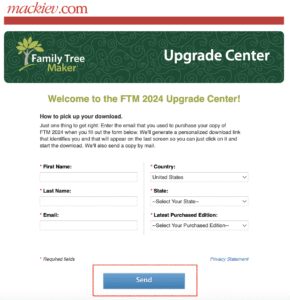
2. Click the email link or go to the Family Tree Maker Upgrade Center on the publisher’s website. This website assists customers in obtaining their pre-ordered or upgraded copies.
3. Your name, email address, and order number—which you can find in the confirmation email—are required on the form.
4. Make use of the same details as your purchase. Try contacting support or Find My Order if you misplace your order number.
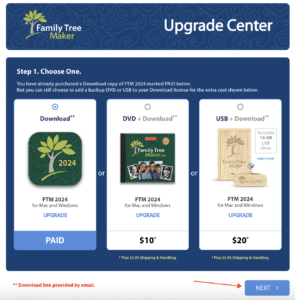
5. Select Mac or Windows to start. If you are qualified, you can usually select both installers.
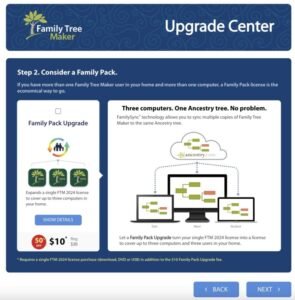
6. Following submission, download links for FTM 2024 will be sent. To download the PC installation, click this link. To make the file accessible to all, place it on the Desktop or Downloads.
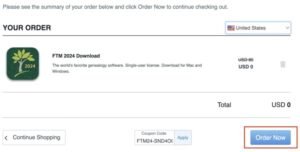
7. After downloading, install the software by following the on-screen directions.
8. First-time users of Family Tree Maker 2024 are required to supply their license key and registration details. Usually, your purchase confirmation or pickup email contains this key.
What to Do If You Purchased a Hard Copy of Family Tree Maker 2024?
If you ordered a DVD or USB along with your purchase, you will receive those physical items by mail. However, to get started right away, you will also receive an email with a download link. This allows you to install and use the software immediately while waiting for delivery. Pick up your copy of FTM 2024 today and enjoy quick access without delays.
Conclusion
You can easily get the Family Tree Maker 2024 by following the instructions above. Use your correct purchase details. Easily get the Family Tree Maker 2024 download from the official website. Then make sure to register your program for the best results. You can always count on support at +1-800-410-2443 to help you pick up your copy of FTM 2024. Moreover, you can create and preserve family history with the most recent version of Family Tree Maker!
FAQs:
Q1. What is FTM 2024, and who should pick it up?
integration, and so much more. To pick up your copy of FTM 2024, you would need to directly purchase it from the MacKiev official site. You would receive a secure download
link or backup option. The existing users can simply access their downloads using their MacKiev account or upgrade notifications.
Q2. Where can I pick up my copy of FTM 2024?
purchasing or using the upgrade link. Remember that you would need the email you used for your purchase to generate the personalized link. You will get a unique
download link it will show up on the final screen. Click on it to begin the download of Family Tree Maker 2024 upgrade. A copy of the same will also be emailed to you.
Q3. Is FTM 2024 available for free or paid?
received it for free. However, most will have to buy the upgrade. But many were able to get the upgrade at a reduced pre-order price.
Q4. Can I download FTM 2024 online?
purchased it. It is available for Windows and Mac. It has options for digital download only. Or only bundled with a DVD/USB.
Q5. What should I bring to pick up my FTM 2024 copy in person?
2024 HAS ARRIVED!” Photo identification (e.g., driver’s license) and the original order number. Alternatively, make sure that your email is accessible on your mobile or is
printed.